Read summarized version with


Introduction
An AI knowledge assistant is an internal bot that answers employee questions from your own company documents — policies, the handbook, HR rules — and cites the source on every reply. Built for HR, operations, and IT teams who lose hours pointing people to the right file, it ships in stage one as a reactive Slack bot over two document stores (public and restricted) — retrieval, citation, and a logging dashboard — in four to six weeks, cutting repeat questions and speeding onboarding.
Ask ten people where your company’s remote-work policy lives and you’ll get ten answers — a Notion page, an old PDF, a Slack message from 2023, “ask HR.” The policy exists; finding it is the problem, and that’s what this article builds, stage by stage.
Data Engineering: From Raw Web to Data Product
We develop and manage custom data solutions, powered by proven experts, to ensure the fastest delivery of structured data from sources of any size and complexity.
We offer:
- Custom Web Scraping & Development
- 15+ Years of Engineering Expertise
- AI-Driven Data Processing & Enrichment
In short:
- What it includes: a Slack bot, a retrieval layer over your documents, source citation on every answer, document-level access control, and a logging and access dashboard.
- When stage one is enough: when you need fast, grounded answers from internal policies — most teams stop here.
- When stage two is needed: when the bot must act — route approvals, trigger workflows, reach into internal systems — and those processes are already defined.
- Tools compared: NotebookLM (fastest pilot, bundled in Google Workspace) versus OpenAI File Search (production backend, billed per query).
What Is an AI Knowledge Assistant for Internal Company Policies?
An AI knowledge assistant for internal policies reads your company’s own documents and answers questions about them — not the open web, not a model’s training data. People call it a knowledge assistant AI, an internal copilot, or “the policy bot”; the label matters less than the constraint: answers come from documents you control and can point to.
How an Internal Assistant Helps Employees Find Answers Faster
Someone asks in Slack where the latest expense rule lives; two people send PDFs from different quarters, one says “ask Finance,” and twenty minutes vanish on an answer that was nowhere obvious. An internal assistant collapses that loop into one grounded reply with the source attached — fewer expert pings, lower onboarding load, faster answers.
Why Slack Is a Natural Interface for Internal Knowledge Access
Most internal tools fail on adoption, not capability — people won’t open a new web app to ask what they could ask a human. A Slack bot needs no onboarding: an employee types a question in a channel or DM and the answer returns in the thread — proven across our enterprise AI chatbot development services, including chatbot-driven automation for an insurance customer. On Microsoft Teams the same architecture applies — only the front door changes.
What Makes This Different From a Generic Chatbot
A generic chatbot draws on a model’s broad training. Its AI assistant general knowledge capabilities can name the capital of France but not your parental leave policy — public enterprise AI assistants knowledge is wide and shallow where you need narrow and exact. Notion AI and Microsoft Copilot read inside your workspace but answer from all of it at once — no whitelist for HR files, a thinner citation trail (more in our AI chatbot for business primer). Three things set a dedicated internal assistant apart:
- Closed source set. Answers come only from documents you index, nothing from the open web or training corpus.
- Citation on every answer. Each reply carries the source passage and link, so the reader verifies rather than trusts.
- Access rules at the document level. Two stores — public and restricted — keep HR files out of channels where they don’t belong.

Core Architecture of the AI Knowledge Assistant
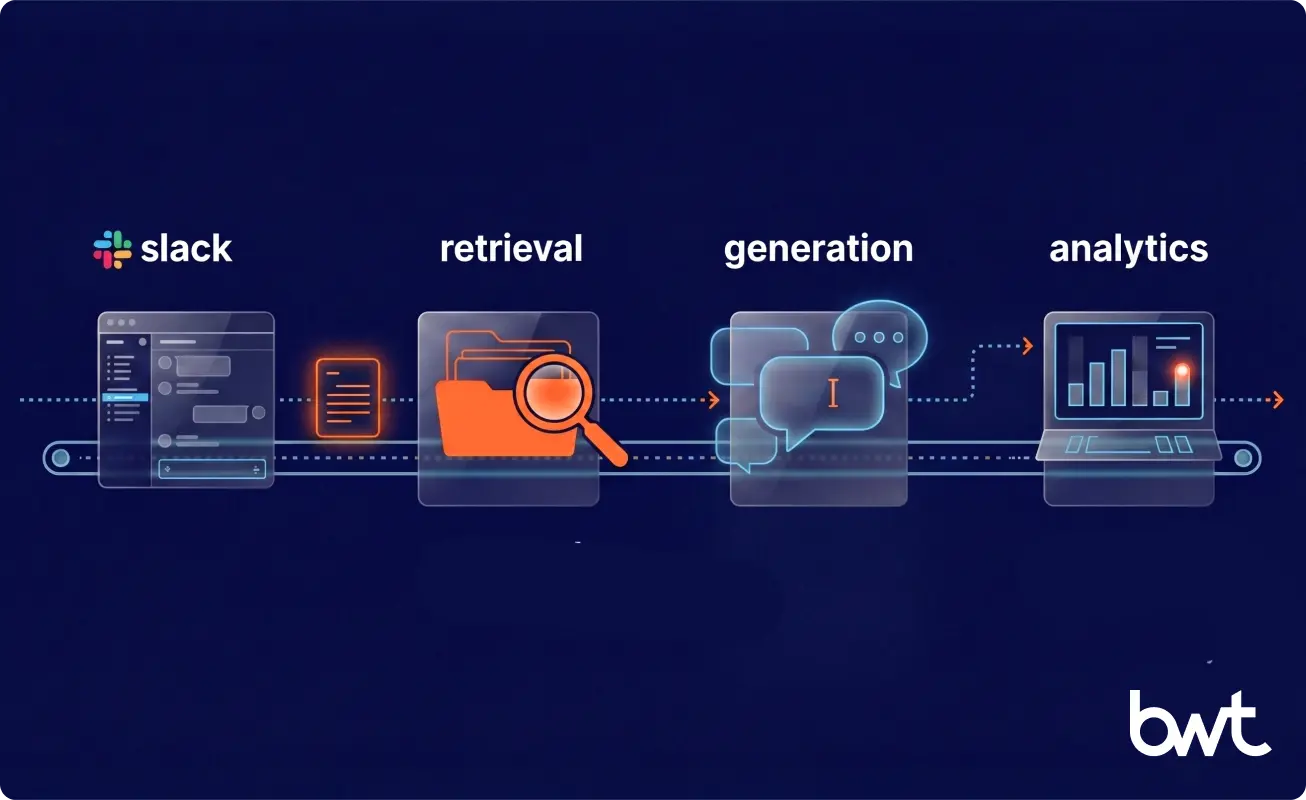
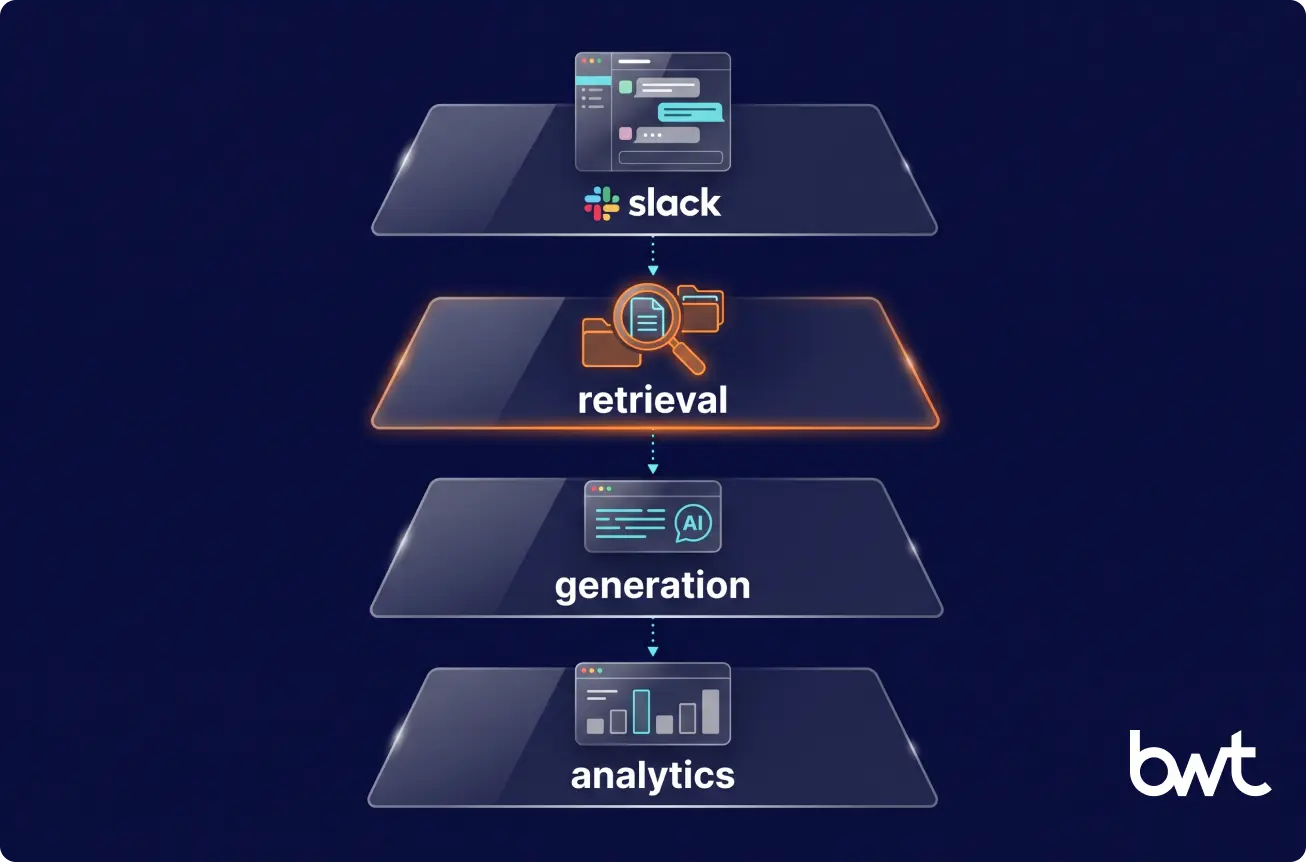
The core is smaller than people expect: an interface, a retrieval layer, a generation step, and a thin analytics surface. Get these four right and people use it daily.
|
Stage 1 (ship in weeks) Slack channel/DM ↓ question Retrieval (NotebookLM or OpenAI File Search) ↓ top passages + access check (public | restricted store) Generation (LLM) → answer + source citation ↓ Analytics dashboard (logs, usage, user access) Stage 2 (add when processes are clear) Same Slack + retrieval + access layer + Orchestration (LangGraph / LangChain): human-in-the-loop, proactive pings, multi-step actions into internal systems |
The stage-two version reuses the entire stack; only the orchestration layer gets rebuilt.
Slack Bot Interface for Employee Questions
The bot runs on a standard Python or Node.js backend: it listens, hands the question to retrieval, and posts the answer in the same thread, deliberately reactive. Four behaviors are fixed on day one: replies stay threaded; an unsure bot points to an owner; answers return in seconds; and tone and citation layout are set up front so every reply reads the same.
Knowledge Retrieval From Internal Documents
This is the engine. Retrieval finds the passages most likely to hold the answer and passes them to the model as context — retrieval-augmented generation (RAG), documented in Grounding and Retrieval Augmented Generation (AWS). “What’s our travel policy?” then returns an answer from the HR documentation itself, no retraining.
Response Generation With Source Attribution
Retrieval finds the passage; generation turns it into a readable sentence and attaches the source. Attribution is the trust mechanism — a citation like “(Employee Handbook, section 4.2)” lets the reader check the claim in one click. Three failure modes get named handling, not silent guessing:
- Low-confidence retrieval. When passages don’t cleanly answer, the bot says it’s unsure and points to the document owner.
- Conflicting documents. When two policies disagree, it returns both with their dates and flags the conflict.
- Permission mismatch. When the answer needs a restricted document the asker can’t see, it says so and names who can approve, instead of leaking a preview.
Basic Analytics and User Management Dashboard
The last core piece is a simple dashboard with two jobs: it logs every question and answer, and it manages users — who has access, at what level. Version one just answers “what are people asking?” and “who can see the restricted documents?”
“The bottleneck in these systems is rarely the model. It’s whether retrieval pulls the right paragraph out of your documents. Teams obsess over which LLM to use and then feed it the wrong context. Spend your first week on retrieval quality against your real files, not on model selection..”
— Dmytro Naumenko, CTO at GroupBWT
Also Read: Data Readiness for AI: How to Prepare Your Data for Successful AI Implementation
How the Slack Bot Works in Stage One
Stage one is intentionally boring: the bot answers questions, not tickets or workflows, and that reactive Q&A flow delivers value immediately. Every exchange gets logged — which policies confuse people, which answers land, where documents are thin — so an AI-powered knowledge assistant that records what it’s asked tells you where to improve.
Knowledge Retrieval Layer: How the Assistant Finds Answers
Answer quality in any enterprise AI assistants knowledge base is decided here, in retrieval, more than anywhere else. Two tools cover most internal-policy cases at comparable effort; test both on your real documents and keep the one that answers better. We ran NotebookLM ourselves over Slack threads, Jira tickets, Confluence pages, and meeting transcripts before moving to a custom agentic architecture — so the trade-offs below come from use, not a pitch, and as our work on training data for AI shows, quality is decided by the document pipeline, not the model.
NotebookLM is the fastest way to pilot retrieval quality, not necessarily where you stay: a managed RAG product inside Google Workspace, reached by the bot as a user, grounding and citation strong on our documents, cost bundled into the Workspace seat. A backend needing programmatic control graduates to OpenAI File Search — a mature vector store on the Assistants API, billed per query. Pilot on NotebookLM to settle quality fast; budget for the move once the bot is real.
| Factor | NotebookLM (fastest pilot) | OpenAI File Search (production backend) |
| What it is | Managed RAG product inside Google Workspace; not a general backend API | Vector store + Assistants API; classic retrieval backend |
| Grounding & citation quality | Strong on policy-style documents in our tests | Solid and predictable across document types |
| Setup effort | Workspace setup + document linking; limited API surface | Mostly admin-console; richer API for custom integrations |
| Cost per query | ~$0 marginal (bundled in the Workspace seat) | Billed per query; rises with the reasoning tier |
| Best for | Teams already on Google Workspace prioritizing answer quality | Teams needing programmatic control or a mature SDK |
| When not to use | When you need a programmatic backend or aren’t on Google Workspace | When a Workspace-bundled pilot already meets quality and you want to avoid per-query cost |
Bottom line: start on NotebookLM if you’re already on Google Workspace and want answer quality fast for near-zero marginal cost; move to OpenAI File Search when you need programmatic control or a mature SDK. Decide retrieval first — the rest of the stack is cheap by comparison.
Documents change — a handbook revised in March must not return February’s answer in April — so the AI assistant knowledge update process is part of the architecture: both tools re-index automatically from the source folder (Drive, SharePoint, Confluence), and the dashboard shows when each source was last reindexed.
Access Control and Secure Document Separation
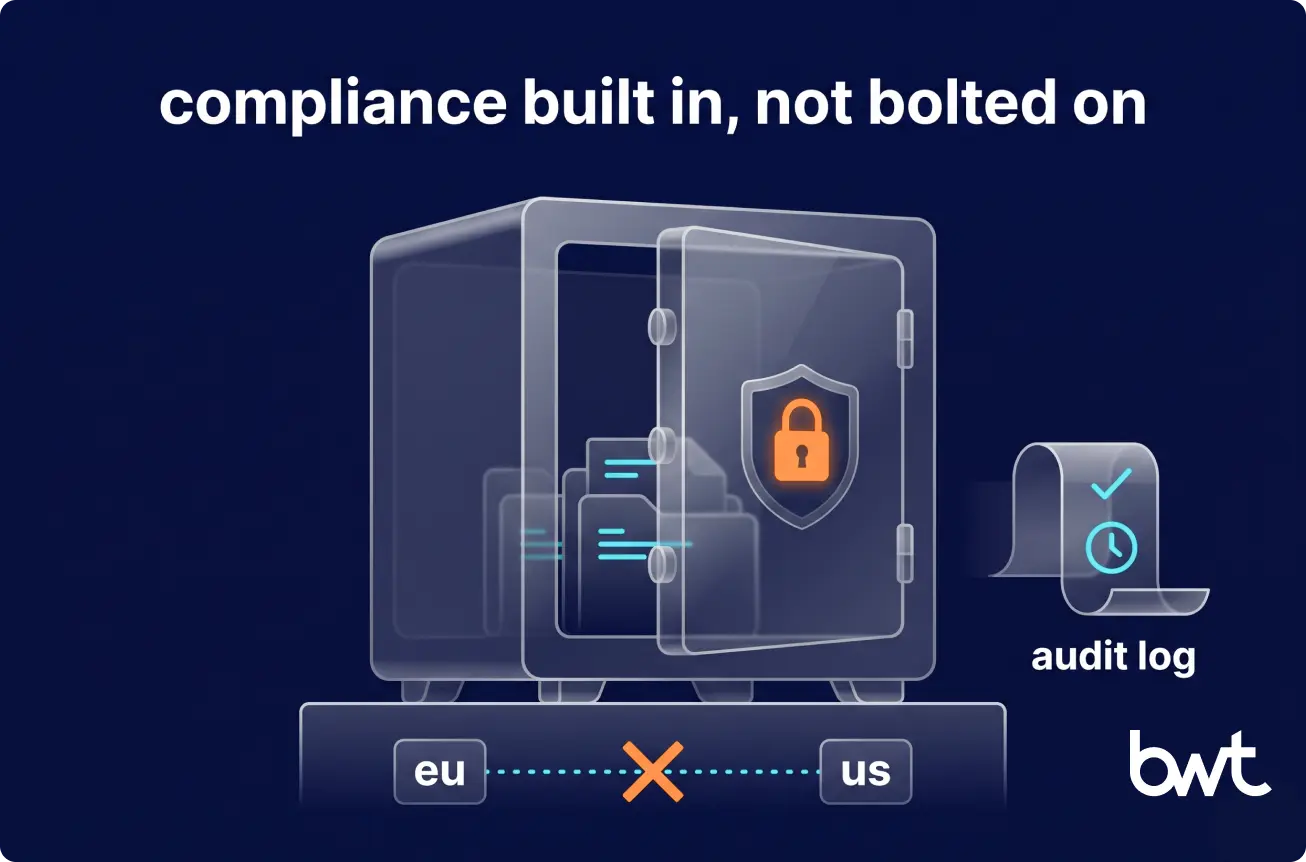
Not every document is for everyone — salary bands, performance reviews, and board materials can’t surface where an intern can read them, so access control is built in, not bolted on. We use two stores: one public (general policies, handbook, FAQ), one locked to a whitelist for sensitive records (HR files, financials, management docs). The bot identifies the asker by Slack user ID, checks the authorized list, and picks the store, so a restricted document never reaches someone outside it. Finer control — board-only, region-locked — scales the same check to more stores or document-level tags.
The whitelist is owned by whoever owns the sensitive set — HR for personnel files, Finance for compensation — through the same admin dashboard the assistant logs to. Strong enterprise AI assistants knowledge governance starts there: two stores cost almost nothing up front; retrofitting after a leak costs everything. The access check runs in code before retrieval, not as a prompt a user can argue the bot out of. At harsher stakes — a regulated US healthcare platform live since 2019 — sensitive records flow through a separate logger with role-based checks on every read: separation at the storage level, not the UI.
“The failure I see most often is treating access as a UI filter — hide the channel and hope no one looks. The moment you let HR files and public policies share one index, you can’t cleanly unmix them; you end up re-indexing under pressure while someone waits to learn what leaked. Decide the split on day one, while it’s still a configuration choice and not an incident.”
— Borys Mikusevych, COO at GroupBWT
Decide first: the public/restricted split, on day one, while it’s a config choice and not an incident.
Postpone to stage two: finer-grained roles until you need them.
Compliance, Data Residency, and the Regulated Audit Trail
If you’re not regulated, the two-store split already covers you — skip to logging. For HR, Legal, and Finance owners, the architecture answers “where does this fit our compliance regime?” in four places. GDPR: European documents stay in the same data-protection envelope as before, and a subject access request is one query against the dashboard’s log of every question asked and document returned. SOC2 / ISO 27001: the same logging layer is the audit trail — every query, passage, and access decision stamped with user, timestamp, and source. Data residency: the vector store and logs sit in the region the document set requires (EU or US), never replicating silently. Right to be forgotten: one dashboard action deletes across source, index, and logs at once.
Why Logging and Analytics Matter From Day One
Logging is the cheapest high-value thing you can build, and the first thing teams skip. Don’t. Every question is a signal: forty people asking about one expense rule in a week means a confusing policy or a missing document. The same dashboard manages access. Teams that wire enterprise AI assistants knowledge retrieval to a logging layer from week one prove the assistant’s value the day someone asks: an AI-powered knowledge assistant that records its own usage earns its next stage with evidence, not opinion.
How the Architecture Evolves Into Advanced Workflows
Stage one answers questions. Stage two acts — where AI knowledge assistants stop being reference tools and start participating in work, reaching into internal systems like an access-management tool that grants permissions. That’s where orchestration with LangGraph and LangChain earns its place: at this stage, not earlier, for three kinds of capability.
When to Add Human-in-the-Loop
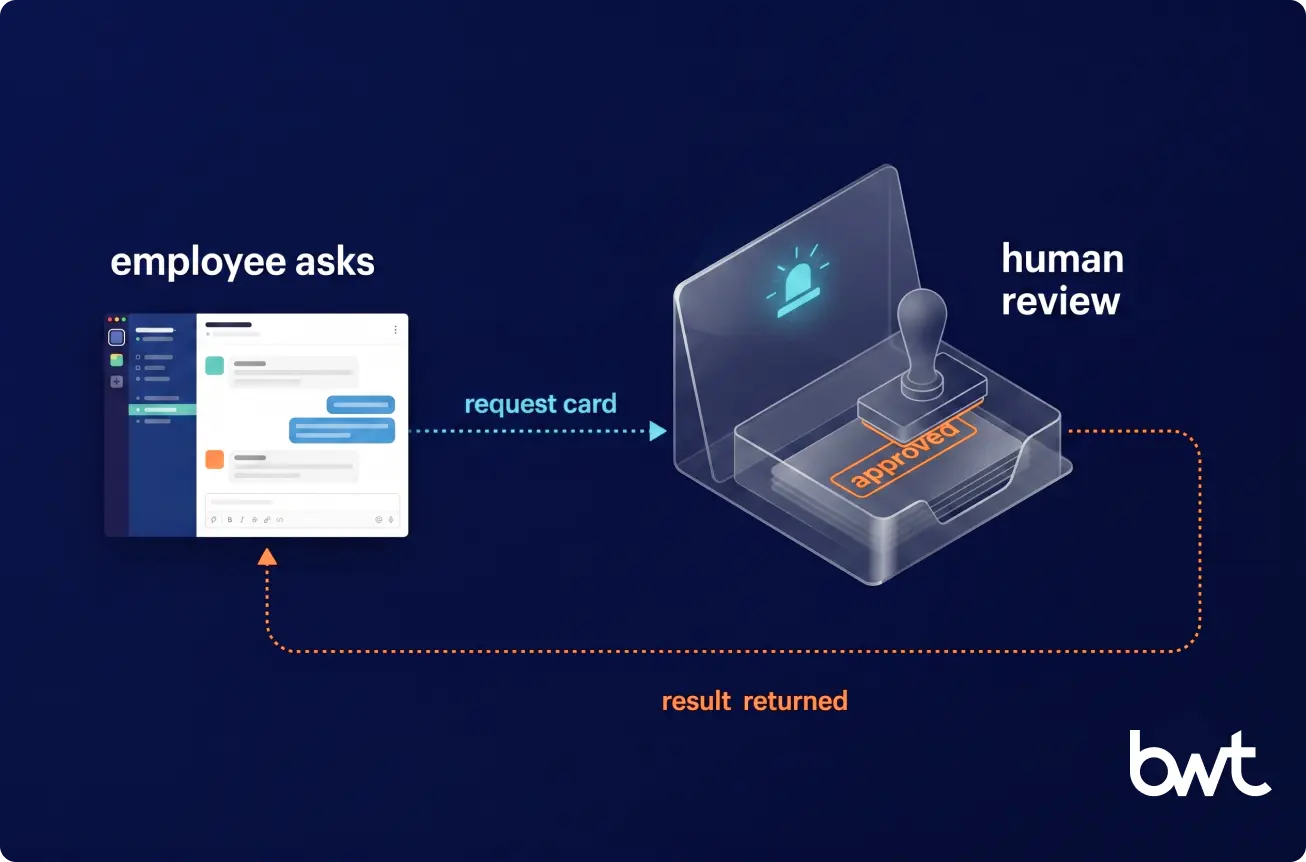
Some requests shouldn’t be answered by a bot alone. Anything needing judgment or approval gets escalated to the responsible person — confidence-aware generation, where the system escalates instead of asserting when passages don’t support an answer well enough. On a government procurement platform we’ve run for years, the same pattern classifies 300–400 tender releases a day, routing to a human below the confidence threshold and answering above it.
When Proactive Bot Actions Start Making Sense
A proactive assistant initiates instead of waiting — reminders, confirmations, flagging a policy a team hasn’t acknowledged. Useful and easy to get wrong: a bot that messages people unprompted has to be right, or it becomes noise people mute. Add it only once you trust the reactive core.
How LangGraph and LangChain Extend the Orchestration Layer
LangGraph and LangChain handle multi-step scenarios — actions with conditions, branches, and calls into several systems at once. Example: a time-off request where the bot checks balance and policy, opens it in the HR system, pings the manager, and posts the result in the thread. That runs fine on a plain backend; the frameworks earn their place once branches multiply — which is why our custom generative AI development practice reaches for them here, with the Slack interface, retrieval, and access split unchanged.
Why a Phased Architecture Works Better Than Overengineering Early
The expensive mistakes come from building complexity for processes nobody has defined yet — orchestration graphs for workflows that don’t exist, an agentic layer maintained for a year before anyone uses it. The phased path is concrete: stage one is the reactive Slack bot, two stores, and a logging dashboard — a knowledge base AI assistant in its smallest useful form. Stage two comes only when the processes it would automate are settled, and the bot’s own logs are the brief.
Best takeaway: earn each layer — ship stage one, let its logs tell you what to build next, and add orchestration only when a real process is waiting for it.
“The expensive mistake isn’t building too little. It’s building orchestration for workflows you haven’t defined yet, then maintaining that complexity for a year before anyone uses it. Earn each layer — the reactive bot tells you, through its own logs, exactly what to build next.”
— Eugene Yushenko, CEO at GroupBWT
Best Practices for Building an Internal Knowledge Assistant
A few principles separate an assistant that lasts from one abandoned in a quarter. Win retrieval before workflow: a brilliant orchestration graph on weak retrieval still gives wrong answers — an AI knowledge base assistant disappoints because it cites the wrong paragraph, not because its workflow is too simple. Build access control in from the start, and keep analytics, governance, and extendability in scope from version one — serious enterprise AI assistants knowledge work ships the boring parts first.
Need Help Designing an AI Knowledge Assistant for Internal Policies?
The hard part isn’t the model — it’s sequencing the build so version one ships fast and grows without a rewrite. An off-the-shelf platform (Glean, Guru, Microsoft Copilot Studio) may fit; a custom build earns its place when you need a closed source set, storage-level access separation, and a citation trail a packaged tool won’t bend to. Where teams usually start with us:
- A retrieval-quality pilot on your own documents — answer quality measured on your real content before any full build.
- NotebookLM vs OpenAI File Search on your internal policies — side by side, on your files, not a generic benchmark.
- Stage one scoped in a single workshop — Slack bot, two stores, citation, and dashboard, mapped to your volume and access rules.
- Access control and source separation mapped before rollout — the public/restricted split decided on day one.
We’ve built storage-level access separation and audit trails for a regulated healthcare platform, and confidence-threshold classification for a government procurement platform. Bring your document set — we’ll measure NotebookLM against OpenAI File Search and ship stage one on your Slack.
A bot that answers questions from your company’s own documents rather than a model’s general training. You ask in plain language; it retrieves the relevant passage from your internal library and replies with the answer and a source link you can verify — which is what separates it from a consumer chatbot.
A reactive Slack bot on a defined document set typically launches in four to six weeks, most of it spent on retrieval tuning, identity wiring, and access-rule mapping. To train an AI chat assistant on company knowledge you don’t fine-tune a model — you index your existing files so the bot can find them, then re-index automatically when a document changes.
The bot answers only when retrieval finds a supporting passage; below a confidence threshold it says so and points to a human owner. Every answer carries the source link for one-click verification, and every wrong-answer report in the logs becomes a tuning signal — a missing document, a stale version, or a passage to rewrite at the source.
Both tools handle multilingual document sets out of the box: employees ask in their working language and get answers grounded in passages written in another, citation preserved. Pick one answer language per channel, or the experience drifts. Real-time knowledge assistance across languages is strongest where a human-translated version already exists, since the bot grounds its answer in that text rather than translating on the fly.
Test both on your real documents — they take similar effort to set up and the right choice depends on your content. We start with NotebookLM for grounding and citation quality and keep File Search as a mature, predictable fallback. The main trade-off is cost: File Search bills per query, while NotebookLM bundles into Google Workspace pricing.
Read summarized version with
Data Engineering: From Raw Web to Data Product
We develop and manage custom data solutions, powered by proven experts, to ensure the fastest delivery of structured data from sources of any size and complexity.
We offer:
- Custom Web Scraping & Development
- 15+ Years of Engineering Expertise
- AI-Driven Data Processing & Enrichment