

Data extraction for retail is the process of collecting, standardising, and delivering decision-ready signals (prices, availability, promos, reviews, assortment) from internal and external sources—on a schedule your business can actually act on.
If the data doesn’t arrive clean, comparable, and on time, you don’t have an “analytics problem.” You have an operations problem—and operations problems leak margin.
What you’ll get from this guide:
- A clear definition of extraction vs scraping vs analytics (with a simple analogy).
- A practical pipeline blueprint with QA checkpoints and “data contract” basics.
- Retail-focused use cases and recommended refresh cadences.
- A decision matrix for manual vs automated vs managed services.
- A 10-step launch checklist by GroupBWT you can copy/paste into a project doc.
If you want an example of how a managed team packages this end-to-end (coverage, QA, delivery), see our retail scraping services page.
Why retailers lose competitive advantage without extraction
The PwC Global M&A Industry Trends in Real Estate and Real Assets: 2026 Outlook, published February 3, 2026, describes a market in transition, where capital is rotating away from traditional property types toward high-growth, infrastructure-adjacent platforms.
Retail advantage comes from response time, not prettier dashboards. When competitors change prices daily and availability shifts hourly, “next week’s report” becomes a margin penalty.
Three hidden costs we repeatedly see when teams rely on manual tracking or unstable feeds:
- Margin leakage: you react late to competitor price moves (or react fast to wrong data).
- Operational drag: merchandisers spend hours checking PDPs instead of making decisions.
- Data distrust: once the business catches a few errors, people stop using the dataset—and the project dies quietly.
Example: when a competitor drops price on a hero SKU, a 2-hour response beats next-day analysis
In a typical mid-sized retailer (often ~10K–50K SKUs), monitoring 2,000 hero SKUs can cover roughly ~4–20% of the catalogue but drives a disproportionate share of margin. That’s why “small scope, high value” pilots work.
When Competitor X drops the price on SKU Y, a useful loop looks like this:
- Alert triggers within 2 hours (vs ~18–24 hours for manual checks in many teams).
- The rule proposes an action (match, hold, or escalate) based on your margin floor (your internal minimum acceptable margin / break‑even guardrail price after costs and channel fees).
- A merchandiser approves the move, and you log the decision for later learning.
The win isn’t “more data.” The win is controlled, with a repeatable response time.
Retail data fragmentation: why your “same SKU” isn’t the same product
Common fragmentation patterns:
- Same SKU, different naming (colour/size variants, regional SKUs).
- Different “availability” definitions (in stock vs ships in 2–3 days).
- Promo logic hidden in carts, loyalty pricing, or personalised offers.
If you don’t normalise this early, you’ll argue about definitions instead of acting on signals.
Speed vs accuracy: solve the trade-off with a two-lane dataset (fast alerts + trusted reporting)
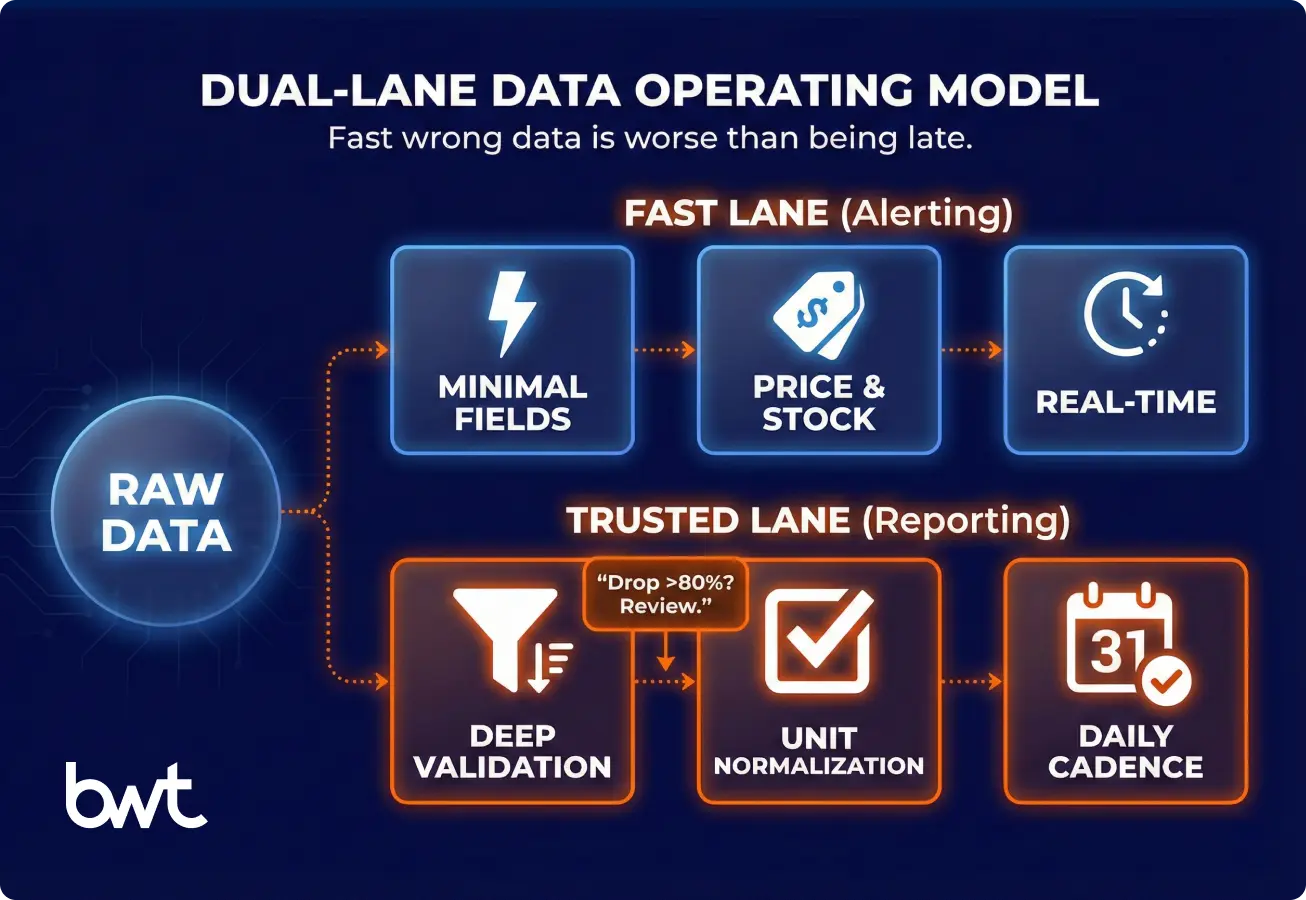
Speed is a competitive advantage only when it meets a minimum accuracy bar. A fast wrong dataset triggers wrong price moves, which is often worse than being late.
The practical solution is a two-lane dataset:
- Fast lane (alerting): minimal fields, strict sanity checks, fast refresh. Use it to trigger human review. If you later add automation, keep it constrained (hard guardrails + logging) and treat it as a separate phase.
- Trusted lane (reporting): deeper validation, enrichment, and reconciliation. Use it for price indexes, weekly decisions, forecasting, and auditability.
In most teams, this is one collection run that writes a raw snapshot, then two downstream processing paths.
The fast lane parses only the fields needed for alerts (e.g., price, stock, marketplace seller, timestamp) and publishes quickly.
The trusted lane processes the same snapshot later with heavier mapping and reconciliation. In rare cases (e.g., sub-hour refresh for a small subset), you may run a separate high-frequency crawl for that subset.
“In high-frequency retail, a 404 error is actually a ‘good’ failure because it stops the pipeline loud and clear. The dangerous failures are silent—when a parser technically succeeds but misreads a ‘pack of 6’ as a single unit, or misses a ‘ships in 4 weeks’ badge. If your extraction layer relies solely on HTTP status codes and doesn’t have semantic validation rules (like ‘price cannot drop 80% without manual review’) that flag these anomalies before they hit your pricing algorithm, you aren’t automating efficiency; you are automating revenue leakage.”
— Oleg Boyko, COO, GroupBWT
A practical rule we use in QA reviews (and see work best in retail engagements):
- If a field changes hourly (price/stock), validate it more often and block obvious outliers fast.
- If a field changes monthly (brand/category), validate it less often but validate it deeper (mapping, taxonomy, dedupe).
A simple “minimum viable accuracy” starting point:
- Alerting lane: catch the direction correctly (price down/up), identify the right SKU/marketplace seller, and timestamp reliably.
- Trusted lane: meet completeness + variant mapping + unit normalisation targets before you let it drive automated pricing.
How extraction moves data from folders into decisions
The shift is operational, not philosophical. Data should trigger price changes, not collect dust in Google Drive.
For the data extraction for retail industry, the goal isn’t to capture “everything.” It’s to capture the few signals that change pricing, assortment, replenishment, and MAP enforcement—then deliver them with an SLA the business can trust.
If no one owns the action, even a perfect dataset turns into “interesting” data.
Structured vs unstructured retail data
Structured data is predictable; unstructured data is messy but often explains the “why.”
Quick examples:
- Structured: price, currency, in_stock, seller, delivery_eta.
- Unstructured: review text, promo copy, store notices, social captions.
If you only track structured fields, you’ll miss early warnings (e.g., packaging complaints) that show up in text weeks before returns spike.
Internal vs external data sources and when to combine
Internal sources explain your performance. External sources explain your market. Most retailers need both, but for different decisions.
A quick decision guide:
| Your question | Best source | Why |
| “Which SKUs are hurting margin today?” | Internal (sales, costs, promos) | Only you know your true costs and minimum acceptable margin (your margin floor) |
| “Who undercut us, where, and by how much?” | External (competitor PDPs, marketplaces) | The market sets the reference price |
| “Did the promo actually shift demand?” | Both | You need market context + your sell-through |
| “Are resellers violating MAP?” | External + internal product rules | You need both observed prices and your policy |
Common sources:
- Internal: ERP, OMS/WMS, PIM, sales, returns, customer support tickets.
- External: competitor PDPs, marketplaces, review platforms, social, ad libraries, and news.
Data sources & refresh cadence: a planning table
Start with sources that map directly to decisions, not sources that look impressive in a slide.
| Source type | What you extract (examples) | Typical cadence | Common gotcha |
| DTC e-commerce | price, stock, promo, shipping, variants | 1–24h | promo price appears only in cart |
| Marketplaces | seller price, buy box, rating, shipping | 1–12h | seller identity changes; duplicates |
| Competitor sites | price ladders, bundles, availability | 1–24h | dynamic JS + A/B layouts |
| Reviews/ratings | rating, topics, sentiment drivers | daily/weekly | spam/noise; platform limits |
| Social/trends | keyword volume proxies, virality signals | daily | correlation ≠ causation; best used as a supporting signal, not a primary pricing driver |
| News/promos | campaign dates, discount depth, regions | daily | regional landing pages |
Planning tip: treat these cadence ranges as “alerting vs reporting” bands. For twice‑daily pricing decisions, the alerting lane usually needs refresh closer to the low end (often 1–6h), while 12–24h is typically a reporting cadence.
If you work in beauty/personal care, examples like Boots scraping, Rossmann scraping, and scraping Sephora data show how different retailers expose pricing, variants, and promo logic differently.
Retail use cases that actually get used
Use cases succeed when a specific team owns a specific action. If no one owns the action, your dataset becomes “interesting” and unused.
High-leverage use cases:
- Competitive pricing intelligence: track price index vs key competitors, identify undercutting and promo depth.
- Assortment and availability monitoring: detect out-of-stocks, missing variants, bundle changes.
- Customer sentiment and review analysis: surface product issues (fit, durability, packaging) earlier than returns.
- Demand forecasting and trend detection: combine external trend signals with internal sales velocity.
- Brand and MAP monitoring: enforce Minimum Advertised Price (MAP) across resellers and channels.
Example operational loop:
A retailer monitors 2,000 high-margin SKUs across 6 competitors (a common “hero assortment” scope). When a competitor drops price on a key SKU, an alert triggers a constrained pricing rule (e.g., “match down to the margin floor, otherwise escalate”) and a merchandiser review within 2 hours (often vs next-day manual analysis).
Manual vs automated vs managed: a decision matrix
Manual tracking fails earlier than teams expect because retail changes too fast. The quickest way to fail at data extraction for retail is to treat it like a one-off spreadsheet task.
Compare approaches:
| Factor | Manual collection | Automated extraction |
| Cost curve | linear with SKUs/sources | mostly fixed + marginal scaling |
| Freshness | inconsistent | scheduled / near real-time |
| Error rate | high (copy/paste, bias) | lower, but needs QA |
| Auditability | weak | strong (logs, snapshots) |
ROI estimator (simple):
Monthly value ≈ (avoided margin loss + captured margin uplift + reduced labour) − extraction cost
Make it concrete before you build:
- Which margin line changes (pricing, promos, stockouts, MAP enforcement)?
- Which labour line changes (hours spent collecting vs deciding)?
- Who owns the “approve/act” step when an alert fires?
Tools vs custom builds: where retail typically breaks off-the-shelf scrapers
Generic tools work for prototypes, then retail complexity shows up fast.
“It is easy to write a script that scrapes a price once; it is exponentially harder to build an adaptive architecture that survives when a retailer shifts from a static DOM to a Shadow DOM or alters their currency formatting. We don’t architect for the successful request; we build for layout drift. If your system treats a layout change as an error rather than an expected state to be normalized, your data feed will have gaps exactly when the market is most active.”
— Alex Yudin, Head of Web Scraping Systems, GroupBWT
When off-the-shelf tools usually fail:
- Heavy JavaScript rendering, frequent layout changes, geo-pricing.
- Large SKU coverage (thousands+) across many domains.
- Strict QA needs (unit normalisation, variant mapping, seller deduplication).
A practical framing we use with clients:
- Use tools for prototyping and a small scope.
- Use custom or managed delivery once the dataset becomes operational.
Many teams discover this only after their data extraction retail pilot “works,” but the feed remains too unstable for pricing and supply chain decisions.
A retail extraction pipeline, explained like an operational system
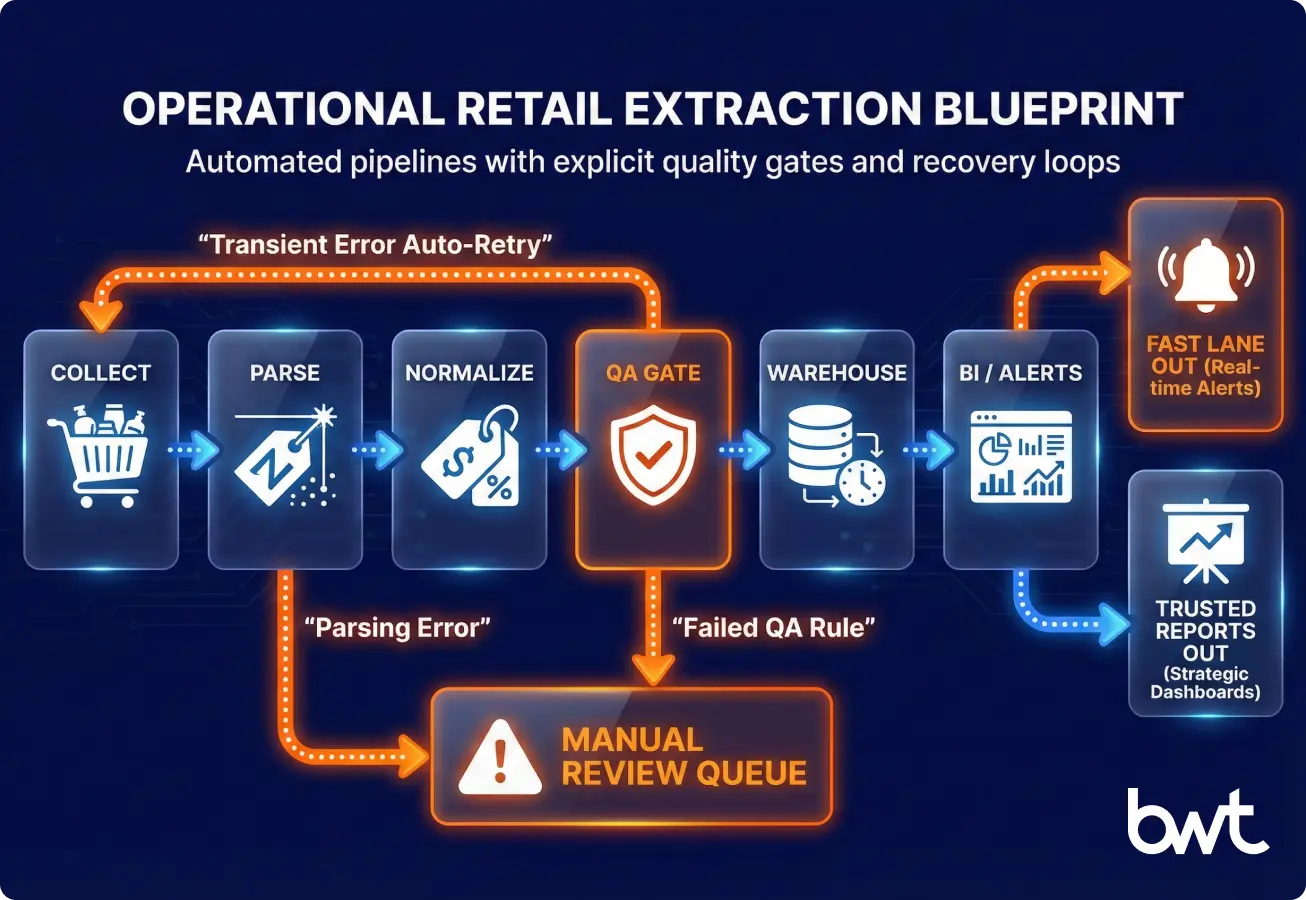
A sustainable pipeline is an agreement between engineering and the business. Define what you collect, how fast you deliver it, how you measure quality, and what happens when something breaks.
A strong retail data extraction pipeline looks like an ETL system (Extract → Transform → Load) with monitoring—not a fragile script.
Plain-English translation for decision-makers:
- ETL is Extract → Transform → Load: you extract data, transform/validate it, then load it into a database. (If you load raw first and transform inside the warehouse, that’s ELT.)
- BigQuery, Snowflake, and Redshift are common “data warehouses” (central databases) that BI teams use for reporting.
Data ingestion: capture snapshots you can audit
Ingestion is how you collect snapshots safely and repeatably. Use API pulls, crawling, or partner feeds.
Key decisions:
- Crawl frequency per source (based on change rate).
- Geo strategy (country, currency, language).
- Respectful access patterns (conservative per-domain rates such as 1–5 requests/second, obey robots.txt where applicable, plus throttling, retry logic, backoff).
Cleaning, normalisation, and enrichment
Normalisation creates comparability. Do currency conversion, unit pricing, variant mapping, taxonomy alignment, and marketplace seller identity cleaning here.
Data contract template (start small):
- Entity: SKU / variant / store / marketplace seller
- Required fields: price, currency, availability, timestamp, source URL
- Optional fields: promo, shipping ETA, rating, review count
- QA rules: range checks, completeness %, duplication thresholds
Glossary (quick):
- Completeness % = “Did we capture the required fields for the expected SKUs?”
- QA gate = a checkpoint that blocks bad data from flowing downstream.
- Schema drift = when a site/app changes fields or page layout, and your extractor starts producing different columns.
- Margin floor = the lowest price you are willing to match/advertise before the offer becomes unprofitable (often defined as a break-even or minimum contribution-margin price after fees and shipping).
- Marketplace seller = the account offering the item on a marketplace listing (a data field you extract).
- Reseller (3P seller) = a third-party seller listing your products (not you).
- MAP (Minimum Advertised Price) = the lowest price resellers are allowed to publicly advertise under your policy.
Storage & BI: deliver history, not “latest”
Store history by default. Retail decisions need trend lines, promo timelines, and backtesting.
“We are moving from extraction for human dashboards to extraction for autonomous AI agents. An LLM cannot ‘guess’ your competitor’s inventory levels without hallucinating. To make retail data AI-ready, we have to move beyond simple CSV snapshots to maintaining full data lineage and temporal context. You need to verify not just the price, but the exact timestamp and geo-location of that price, or your AI models will make confident decisions based on obsolete reality.”
— Dmytro Naumenko, CTO, GroupBWT
Delivery formats that reduce friction:
- CSV for quick adoption (spreadsheets)
- JSON for engineering workflows (apps and APIs)
- Tables in a warehouse for BI dashboards and joins with internal data
Monitoring & QA gates: detect “successful crawl, wrong data”
Monitoring is the difference between a dataset and a liability.
Track:
- Freshness (time since last successful snapshot)
- Coverage (SKUs captured / SKUs expected)
- Drift (field changes, schema breaks)
- Outliers (price jumps, missing stock)
A “successful crawl” does not guarantee correct data. Wrong selectors, partial pages, and bot-mitigation variants can quietly poison your feed unless QA gates catch them.
Predictable failure modes (anti-bot, layout drift, identity) and how to design around them
Retail extraction breaks in predictable ways. Plan for them up front.
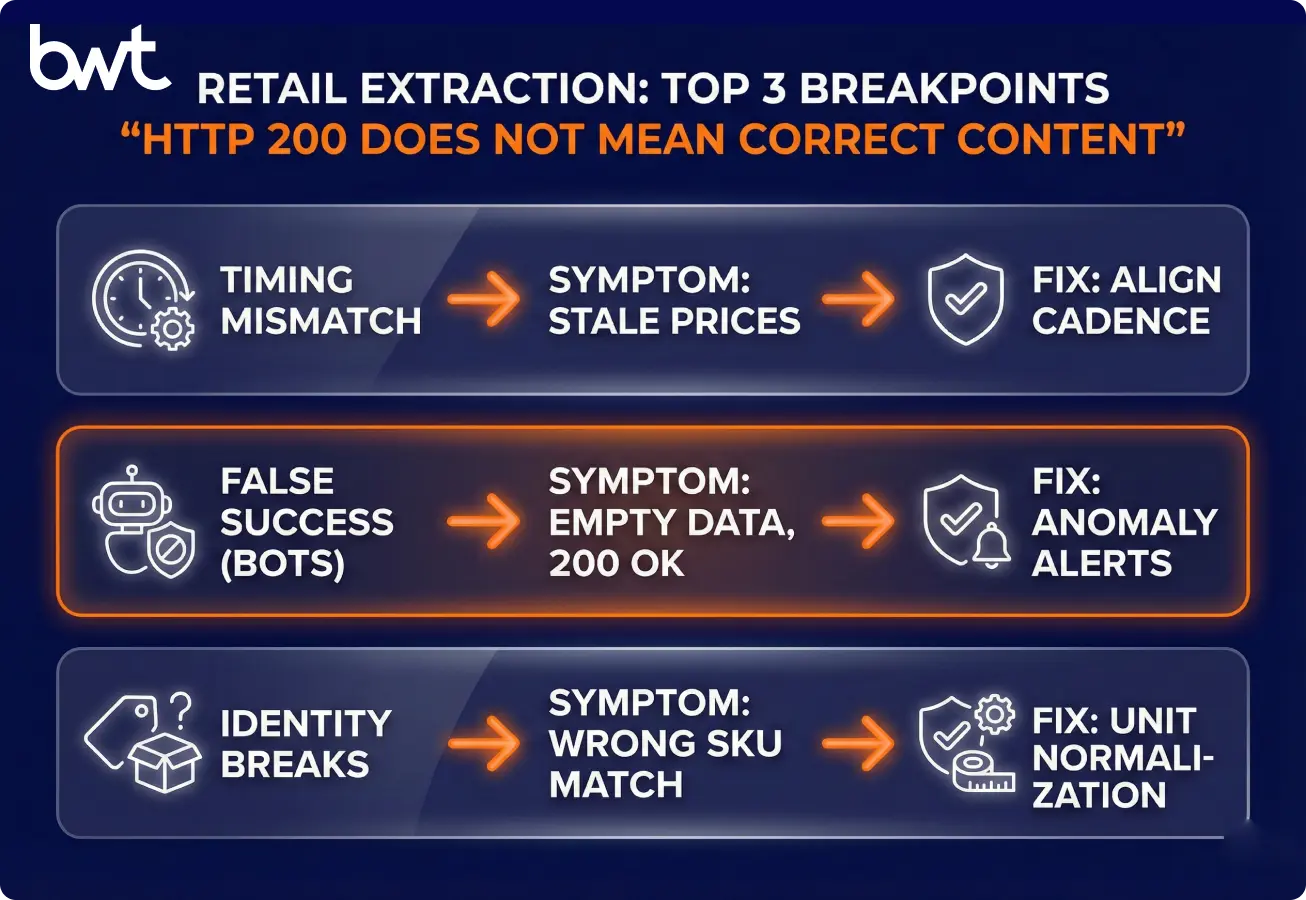
Dynamic pricing and frequent updates
Match your data cadence to your decision cadence. If pricing decisions happen twice a day, a weekly crawl becomes noise.
Anti-bot systems and access restrictions
Access constraints are real, but they’re not the only risk. Even when you get pages back, the content can vary (A/B tests, geo pages, personalised promos, bot blocks that look like “real” pages).
Design for reliability:
- Rotate request patterns responsibly and throttle.
- Monitor for content anomalies, not just HTTP status codes.
- Validate price ranges, currency consistency, and not just HTML presence.
Data inconsistency across sources
Identity is harder than collection volume. SKU matching, variant mapping, and unit standardisation often decide whether the dataset is usable.
Data quality at scale: measure these 4 metrics
Measure quality with metrics, not opinions.
Operational metrics to adopt:
- Completeness % by source and by field
- Validity % (passes format/range rules)
- Freshness SLA by use case
- Reprocessing rate (how often you need re-crawls)
Benchmarks (a starting point we often use in QA reviews):
- 95%+ completeness is typically “pricing-safe” for required fields.
- 90–95% completeness is a grey zone: often acceptable for human-in-the-loop alerting, but risky for fully automated price changes.
- Below 90% completeness usually produces too many false actions and escalations.
Compliance: reduce risk with documentation + legal review
This section is not legal advice. Treat it as an operational checklist, then involve your legal team early—especially if you operate across the EU (EU GDPR) and the UK (UK GDPR) and US states with privacy laws. Note: GDPR generally applies to personal data; product/price data usually isn’t personal data unless you collect personal identifiers (e.g., reviewer names, user IDs, emails).
What to document (so you can explain your process in an audit):
- Source inventory: which domains, locales, and endpoints you access.
- Purpose limitation: why you collect each field and which team uses it.
- Data minimisation: avoid personal data; focus on product-level signals when possible.
- Access method: throttling, authentication (if any), and takedown handling.
- Retention: how long you keep raw snapshots vs cleaned tables.
Case pattern common in enterprise retail:
When a legal team asks “show us how you collect and control this,” the fastest path is a single “extraction dossier” that contains your source list, QA reports, and incident logs. That documentation turns compliance from debate into review.
Two delivery examples (case studies) that show how monitoring programmes handle compliance and brand constraints:
- Market monitoring for sportswear compliance requirements
- Using market monitoring to protect the Walmart brand
Proof from the field: the benchmarks that make retail teams trust the feed
Trust comes from repeatable delivery, not from “one successful scrape.”
In our retail engagements, the improvements that matter tend to look like this:
- Alert latency moves from “next day” to “same day” (hours), enabling controlled reactions.
- Completeness and validity become visible in weekly QA reports, so business users stop debating data.
- Incidents become manageable because you have rerun policies and clear ownership.
Common stakeholder feedback we hear when reliability is in place:
“I stopped double-checking prices manually because the exceptions are the only alerts I get.”
If you’re evaluating options, compare not only extraction coverage but also QA transparency. Our data extraction services overview explains what “delivery with guarantees” typically includes (reporting, SLAs, incident handling), and this list of top companies for data extraction services can help you pressure-test vendor claims.
Growth loops: how extracted signals trigger pricing, CX, and supply-chain actions
Growth comes from faster, safer decisions—not from having more rows. Tie each dataset to an operational loop.
Faster pricing and merchandising decisions
Make alerts actionable. Send one sentence with context: “Competitor X dropped SKU Y by 12% in DE; your margin floor is Z; recommended action: match/hold/escalate.”
Improved customer experience and personalisation
Use reviews and availability to fix what customers feel. If sentiment flags packaging damage and returns rise, treat it as an operational fix, not a marketing message.
Smarter inventory and supply chain planning
External signals help you avoid stockouts and overbuys. Trend detection + promo calendars + marketplace signals can improve ordering timing and allocation.
Vendor due diligence: questions we use before we buy data extraction retail as a service
Vendors look similar until you inspect QA and delivery reliability. Ask for artefacts, not promises—especially when procurement frames this as “simple scraping.”
What to verify:
- Coverage plan: which domains, locales, and SKU volumes?
- Change resilience: how they handle layout shifts and JS-heavy sites.
- QA approach: completeness/validity/freshness metrics and reporting cadence.
- Delivery: formats, warehouse integration, API access, retries.
- Support & SLAs: incident response time, rerun policies, communication.
A simple SLA table you can request:
- Freshness: “95% of snapshots delivered within X hours”
- Completeness: “≥98% required fields populated” (define “required” in your data contract)
- Incident handling: “P1 response within Y minutes” (define P1 explicitly—for example: “no snapshots for the agreed hero SKU set” or “freshness breach >X hours,” not a vague severity label)
When managed extraction becomes the default choice
Managed services make sense when your scope becomes multi-market and always-on. At that point, you don’t want to build a crawling team—you want a data product with guarantees.
Typical triggers:
- 5+ countries, multiple currencies, geo-pricing.
- 10k+ SKUs monitored continuously.
- Multiple stakeholder teams (pricing, supply chain, brand compliance).
- Forecasting/AI needs a consistent history, not sporadic pulls.
Next steps: launch small, hit SLA twice, then scale
If you remember one thing: extraction only matters when it produces a reliable, decision-timed dataset. Start smaller than you want, but design as you’ll scale.
10-step launch checklist (copy/paste):
- Pick one use case with an owner (pricing, availability, MAP, sentiment).
- Define entities and fields (SKU, variant, seller, store; required vs optional).
- Write a data contract (fields + QA rules + cadence).
- List sources and locales (domains, countries, currencies).
- Set refresh cadences per source (based on change rate).
- Decide delivery format (CSV/JSON/warehouse tables).
- Implement QA metrics (freshness, completeness, validity, drift).
- Add alerting and an incident workflow (who fixes what, by when).
- Run a 2–4 week pilot with weekly QA reports.
- Scale scope only after you hit SLA targets for 2 consecutive cycles.
Decision matrix (manual vs tool vs managed):
- Manual: OK for <200 SKUs, single market, non-time-critical decisions.
- Tool-based: OK for prototyping and limited sources with stable pages.
- Custom/Managed: needed when freshness, reliability, and scale become operational.
FAQ
-
What retail data can be legally extracted?
Usually product‑level offer facts (price, availability, promotions) from publicly accessible pages—if you respect Terms of Service, avoid personal data, and don’t bypass access controls.
-
How often should retail datasets be updated?
Refresh at ½–1× your decision cadence: hours for operational pricing; daily for promos; daily/weekly for reviews.
-
Do I need a data engineer to use the extraction services?
Not always. You do need a clear field spec, identifiers, history (snapshots), and QA reporting—otherwise the dataset won’t be trusted.
-
What’s the minimum SKU count where extraction makes sense?
A common pilot is 200–500 hero SKUs. Scale after QA is stable; ~2,000 SKUs is a typical next step.
-
Can I start with one competitor and scale later?
Yes. Prove freshness + completeness + drift control on one domain, then add sources one at a time.
-
Can extraction integrate with BI and AI tools?
Yes—if you deliver stable schemas, timestamps, and versioned snapshots. Integration fails more from schema drift than from connectors.
-
Is custom extraction scalable long‑term?
Yes, if it’s operated like software: tests, monitoring, incident response, and change control.
-
How do you handle sites that change layout or block bots?
Expect drift, monitor it, and use fallbacks (alternate selectors, re‑crawl, limited human verification). Don’t “escalate into evasion” without legal review.