

Why do engineering teams keep reaching for Scrapy when there are dozens of Python web scraping options out there? Probably because nothing else at this level has survived 17 years in open source without a good reason. 60,000+ GitHub stars, 594 contributors, BSD-licensed since 2008 — those numbers speak for themselves.
Search the official Scrapy GitHub repository, and you’ll see what keeps people hooked. A high-performance non-blocking engine sits at the core, Playwright support for JavaScript rendering comes baked in, and you need Python 3.10+ to run it.
This Scrapy framework tutorial won’t waste your time on basics. We dig into the architecture behind enterprise-grade crawling, put Scrapy head-to-head with the usual suspects, and walk through distributed scaling, hybrid setups, and pipeline integration — all drawn from production systems we’ve shipped at GroupBWT. Everything here reflects the 2.13–2.14 release cycle.
Already running Scrapy Python projects? You’ll pick up updated patterns and a few things that might surprise you.
Still deciding whether Scrapy fits your next data pipeline? The architecture breakdowns and case studies further down should settle that question.
How Scrapy Processes a Crawl
Under the hood, Scrapy is event-driven and non-blocking — built on asyncio. Once a spider fires up, the engine takes over the full request lifecycle. It grabs URLs from the scheduler, pushes them through the downloader, hands responses off to spider callbacks, and routes whatever structured data comes out into the pipeline chain.
Here’s a Scrapy tutorial example with the basic workflow:
|
import scrapy
class ProductSpider(scrapy.Spider): name = “products” async def start(self): yield scrapy.Request(“https://example.com/products”, self.parse) async def parse(self, response): for item in response.css(“div.product”): yield { “name”: item.css(“h2::text”).get(), “price”: item.css(“span.price::text”).get(), } next_page = response.css(“a.next::attr(href)”).get() if next_page: yield response.follow(next_page, self.parse) |
That async def start() method? It showed up in Scrapy 2.13.0 and replaced start_requests(), which is now officially deprecated — check the official release notes if you want the full diff. Basically, this made Scrapy async requests a real first-class citizen rather than a workaround. It’s one of the more significant Scrapy trends to come out of this release cycle. And yes, if you still need backward compatibility, keeping start_requests() alongside start() works fine during the transition.
The overall pattern for any Scrapy project is the same. Spider, target URLs, CSS, or XPath parsing logic, yield items or follow-up requests. Concurrency, rate limiting, retries, export — the framework deals with all of that. You can get a working spider in under 20 lines. That’s exactly why a tutorial Scrapy project is such a good on-ramp, even for engineers who’ve never touched web scraping. Most Scrapy tutorial resources begin right there and then layer on architecture and scaling as you go.
Inside Scrapy’s Architecture: Five Components Behind Enterprise Crawling
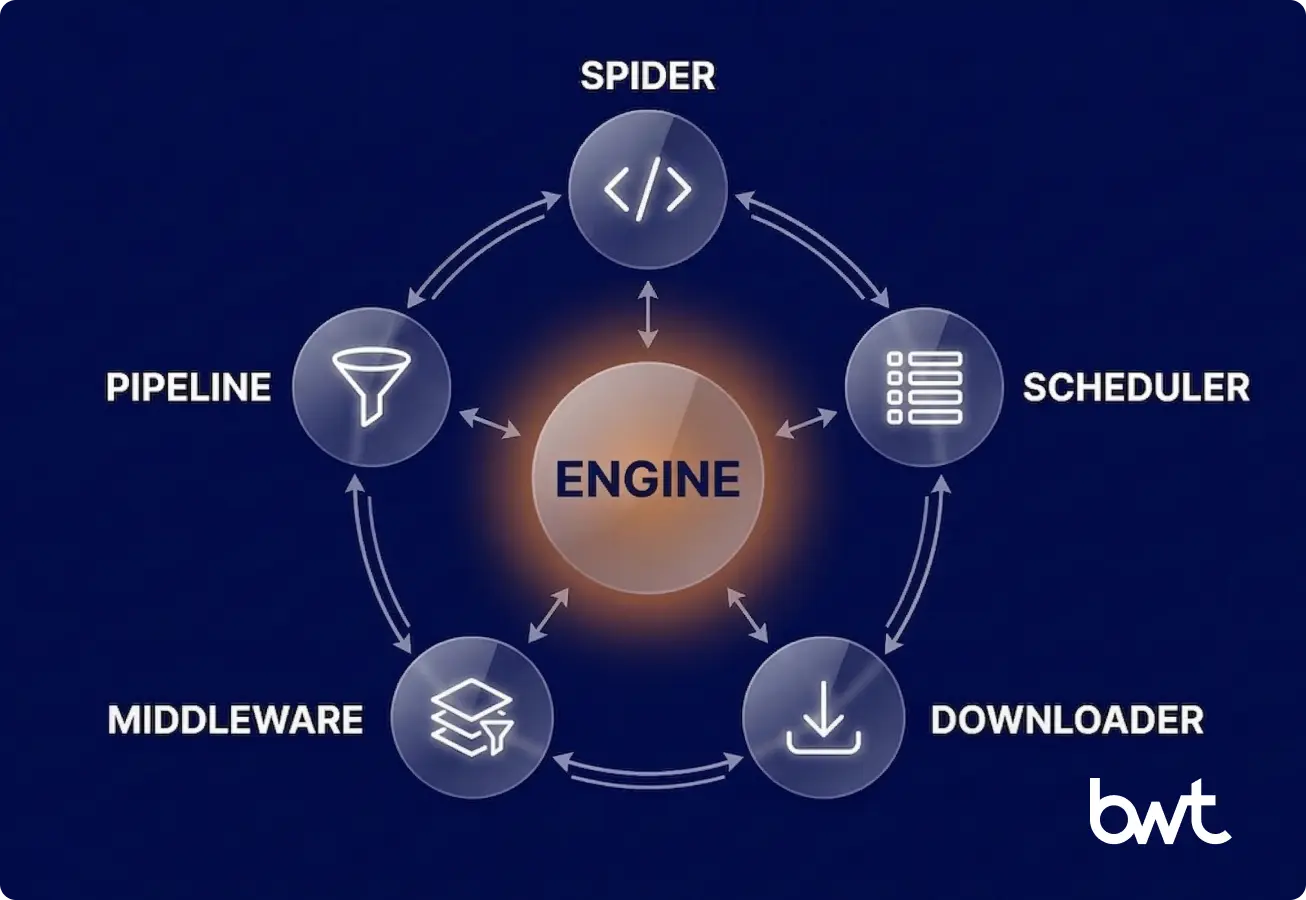
The Scrapy architecture has five core components connected through an asynchronous event loop. Knowing how they interact matters for debugging performance issues and extending the framework.
Spiders
Spiders are Python classes that define crawling logic for specific sites or data sources. Each one yields either dictionaries (items) or Request objects. In a typical tutorial Scrapy setup — say you’re just learning the ropes — you start with one spider. On our production deployments, we’ll have dozens going at once, each pointed at a different domain.
Scheduler
The Scrapy scheduler keeps a priority queue of pending requests and handles URL deduplication through fingerprinting. The current release switched the default to DownloaderAwarePriorityQueue, which spreads requests more evenly across domains — a real improvement for web crawling at scale. It stops any single domain from eating all the downloader’s capacity. In many cases, this
reduces the need for per-domain tuning and often improves crawl fairness across targets.
Downloader
HTTP requests go out, responses come back — that’s the downloader’s job. It obeys your Scrapy concurrency settings: CONCURRENT_REQUESTS sits at 16 by default in the framework, while CONCURRENT_REQUESTS_PER_DOMAIN is 8 at the framework level, but only 1 in the project template. Download handlers — including the ones behind Scrapy + Playwright — run fully async.
Here’s something that trips people up, though. Scrapy separates framework-level defaults from project template defaults. So when you run scrapy startproject, that freshly generated settings.py comes with DOWNLOAD_DELAY = 1 and CONCURRENT_REQUESTS_PER_DOMAIN = 1. That’s way more conservative than the framework’s own fallbacks of 0 and 8. The message is clear: responsible crawling out of the box, no extra configuration needed.
Middleware
Two layers here. Scrapy middleware splits into downloader middleware (sitting between engine and downloader) and spider middleware (between engine and spiders). Outbound, it handles Scrapy with proxy rotation across IP pools, manages cookies and sessions, and implements Scrapy anti-bot handling through user-agent rotation and header randomization. Inbound, it applies anti-scraping countermeasures — catching blocks, triggering retries, and filtering bad responses before they reach the spider. If you want to understand how sites fight back against scrapers, we wrote a separate piece on how to prevent web scraping.
Built-in middleware includes:
- RetryMiddleware — retry logic with configurable backoff
- HttpProxyMiddleware — proxy rotation across request pools
- UserAgentMiddleware — user-agent string management
- HttpCompressionMiddleware — response decompression with protection against decompression bombs, patched in a recent security release per the release notes for CVE-2025-6176
Pipelines
Scrapy pipelines process items after extraction. Each stage handles one concern — data validation, data cleaning, data transformation, deduplication, or storage — and runs in priority order.
A typical production chain:
- ValidationPipeline — schema enforcement, required field checks
- CleaningPipeline — HTML stripping, whitespace normalization, type casting
- DeduplicationPipeline — fingerprint-based duplicate detection
- StoragePipeline — writes to your database, S3 bucket, or message queue
The beauty of Scrapy pipelines is modularity. Bolt on a new processing step, rip out one that’s not needed — and you never have to touch the spider code itself. That separation of concerns pays off fast when you’ve got several engineers working on the same codebase.
Scrapy vs Selenium vs BeautifulSoup
Ah, the eternal Scrapy vs Selenium debate. It comes up in nearly every architecture discussion we have with clients, and the honest answer is always the same: it depends on what you’re building.
| Criteria | Scrapy | Selenium | BeautifulSoup | Playwright |
| Category | Crawling framework | Browser automation (full) | HTML parser (no networking) | Browser automation (headless) |
| JS Rendering | Via plugins (Playwright/Splash) | Native | Not applicable | Native |
| Async Support | Native (asyncio) | Partial (WebDriver BiDi in v4+) | Not applicable | Native |
| Resource Cost | Low (HTTP only) | High (full browser instance) | Negligible (parsing only, no I/O) | Medium (headless browser) |
| Scalability | Built for high-volume web scraping | Resource-intensive at scale | Manual implementation | Moderate |
| Best For | Large-scale data pipelines | Interactive testing, form filling | Quick one-off parsing | JS-heavy SPA rendering |
Let’s clear up a common misconception while we’re at it. BeautifulSoup? It’s a parser. That’s it — not a framework. Putting it next to Scrapy in a comparison is like putting a wrench next to an entire engine block. BeautifulSoup parses HTML you’ve already downloaded. Scrapy manages the full crawl lifecycle: scheduling, downloading, parsing, and pipeline processing.
Where does each tool actually shine? Scrapy is the pick when you need a scalable web scraping framework for scraping millions of pages. Selenium works for interactive scenarios — clicks, forms, and visual checks. Playwright handles JavaScript-heavy SPAs and has mostly replaced Puppeteer in new projects. Learn how to choose web scraping service best practices guide, if you want a longer comparison — including the PHP vs Python for web scraping.
Among the most relevant Scrapy trends right now: the Scrapy + Playwright integration has largely solved the old Scrapy JavaScript handling problem. Playwright plugs in as a custom download handler inside Scrapy. It renders dynamic content while keeping the pipeline and middleware infrastructure intact. Need JS rendering on some pages but not others? You use both together.
Using Scrapy for Distributed and Large-Scale Scraping
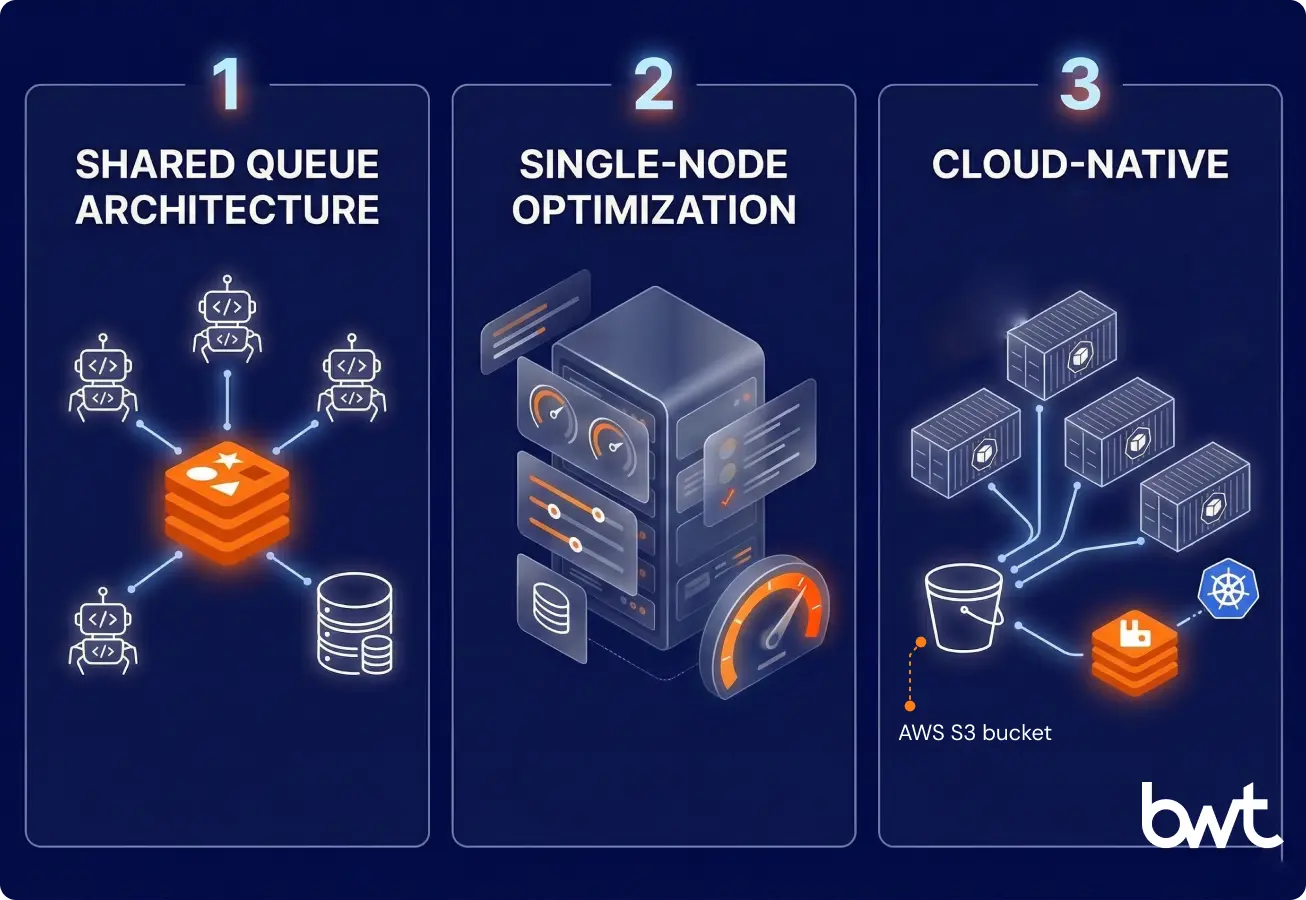
There comes a point where a single box can’t keep up. That’s the moment Scrapy distributed crawling becomes necessary for horizontal scaling. Three patterns show up most when using Scrapy for large-scale scraping:
- Shared Queue Architecture
Replace the in-memory scheduler with a distributed queue — Redis, RabbitMQ, or Kafka.
scrapy-redislets multiple spider instances across machines pull from the same request queue with deduplication and job scheduling. This is the standard approach for large-scale web scraping that Python teams use in production. - Single-Node Optimization
Before adding machines, get everything you can out of one server through Scrapy performance optimization:
# settings.py — tuned for throughput
# WARNING: Adjust these values based on target site capacity.
# Aggressive settings can trigger IP bans or overwhelm servers.
CONCURRENT_REQUESTS = 32
CONCURRENT_REQUESTS_PER_DOMAIN = 4
DOWNLOAD_DELAY = 0.5
AUTOTHROTTLE_ENABLED = True
AUTOTHROTTLE_TARGET_CONCURRENCY = 4.0
HTTPCACHE_ENABLED = True
DNS_RESOLVER = “scrapy.resolver.CachingHostnameResolver”What
AUTOTHROTTLEdoes is watch how fast target servers respond and adjust your request rate on the fly. Adaptive rate limiting, basically. For high-volume web scraping workloads, that balance between speed and politeness isn’t optional — it’s survival. For decision-makers: these settings control how fast and how politely your pipeline hits target servers. Get them wrong, and you face IP bans or data gaps. Get them right, and you pull maximum throughput within safe limits. - Cloud-Native Deployment
Docker and Kubernetes make web crawling at scale manageable — automatic restarts, resource limits, and horizontal pod autoscaling tied to queue depth. Spiders act as stateless workers. The distributed queue and storage layer handle persistence
Here’s what this looks like in practice: our team at GroupBWT built a Scrapy-based pricing pipeline for a hospitality platform that collects rate data from major OTAs across 70,000+ properties daily. Containerized Scrapy spiders on Kubernetes pull from a RabbitMQ queue, with TLS fingerprinting (via
scrapy-impersonate) and containerized VPN nodes for anti-bot evasion. The system processes over 600 million records per month at 99.5% success rate — a scale that wouldn’t work without Scrapy’s scheduler, middleware, and pipeline infrastructure running underneath. No standard tutorial Scrapy teams follow covers this level of deployment, but the architectural principles are the same. We wrote about data pipeline architecture separately if you want the details.“We put spiders in containers to keep control. A single server will fail if you push millions of requests through it. The memory fills up, or the network connection drops. That is why we use Kubernetes and RabbitMQ. The queue sits in the middle, and spiders just pick up the next task. If a spider fails because of a block or a memory issue, the system starts another one. The job goes back to the queue. You get a setup that runs on its own. This is how you make sure the data arrives every day without having an engineer wake up at night to restart a script.”
— Dmytro Naumenko, CTO, GroupBWT
Limitations of Scrapy and When to Use Hybrid Approaches
Scrapy has real limitations. Better to know them upfront.
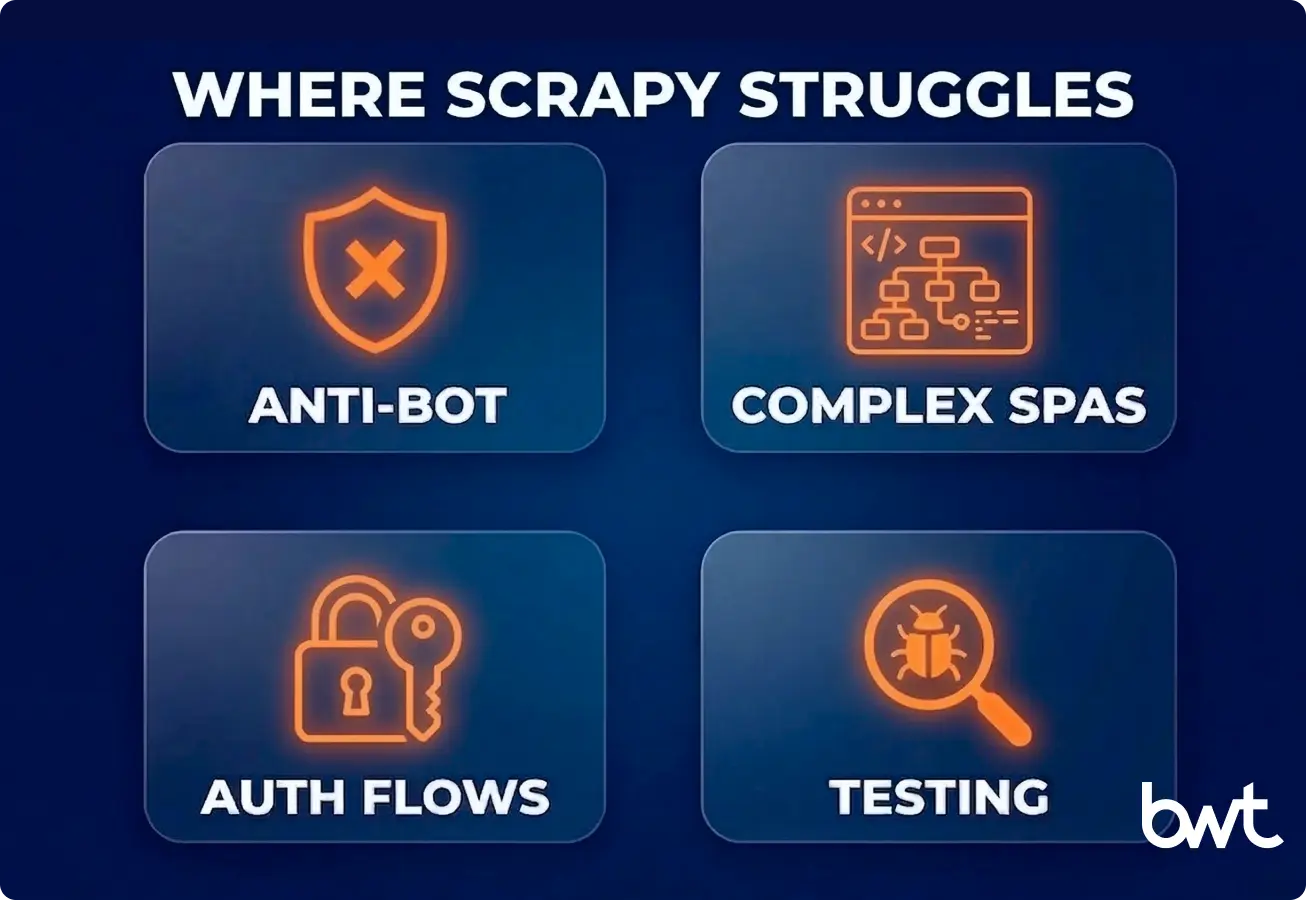
Anti-Bot Systems
The anti-scraping mechanisms out there today — Cloudflare Turnstile, Akamai Bot Manager, DataDome — they’re looking at everything. TLS fingerprints, browser headers, behavioral patterns, the whole nine yards. A vanilla Scrapy request doesn’t carry the browser footprint these systems are trained to expect. Running a headless browser through Scrapy + Splash or Playwright patches that gap, though you do pay for it in resource overhead. We covered how companies protect your brand in a separate piece.
Complex SPAs
The Scrapy + Playwright integration covers most JS rendering needs — loading dynamic content, running AJAX calls, and waiting for elements. But apps with WebSocket-based real-time updates, heavy client-side state, or multi-step interactive flows may still need dedicated browser automation outside Scrapy’s request-response model.
Authentication Flows
OAuth redirects, CAPTCHA, multi-factor auth — these usually need a hybrid approach. Use a browser tool for the login part, then pass authenticated cookies to Scrapy for the actual crawl. Scrapy’s queue management and pipeline infrastructure handle the data-heavy work.
Testing and Debugging
Scrapy has contracts and fake_response patterns for unit testing spiders. But debugging crawl failures in distributed setups takes real work — logging, monitoring, response caching. Any honest Scrapy framework tutorial should mention this operational cost. These broader Scrapy trends — smarter anti-bot defenses, the shift to hybrid architectures — change how production spiders need to be designed and maintained.
“Scraping fails mostly because target sites change their rules. Sites use tools like Cloudflare or DataDome to look at your traffic. They check your TLS fingerprint and headers. A basic Scrapy request looks like a bot to them and gets blocked. We fix this by changing how we connect. We use custom layers and VPN nodes that make our requests look like a normal browser. It takes work to maintain. You can’t just write a spider and forget about it. The target site will update its security next month. You have to build a system that expects to be blocked and knows how to adapt.”
— Alex Yudin, Head of Data Engineering and Web Scraping Lead at GroupBWT
Scrapy in Modern Data Engineering Pipelines
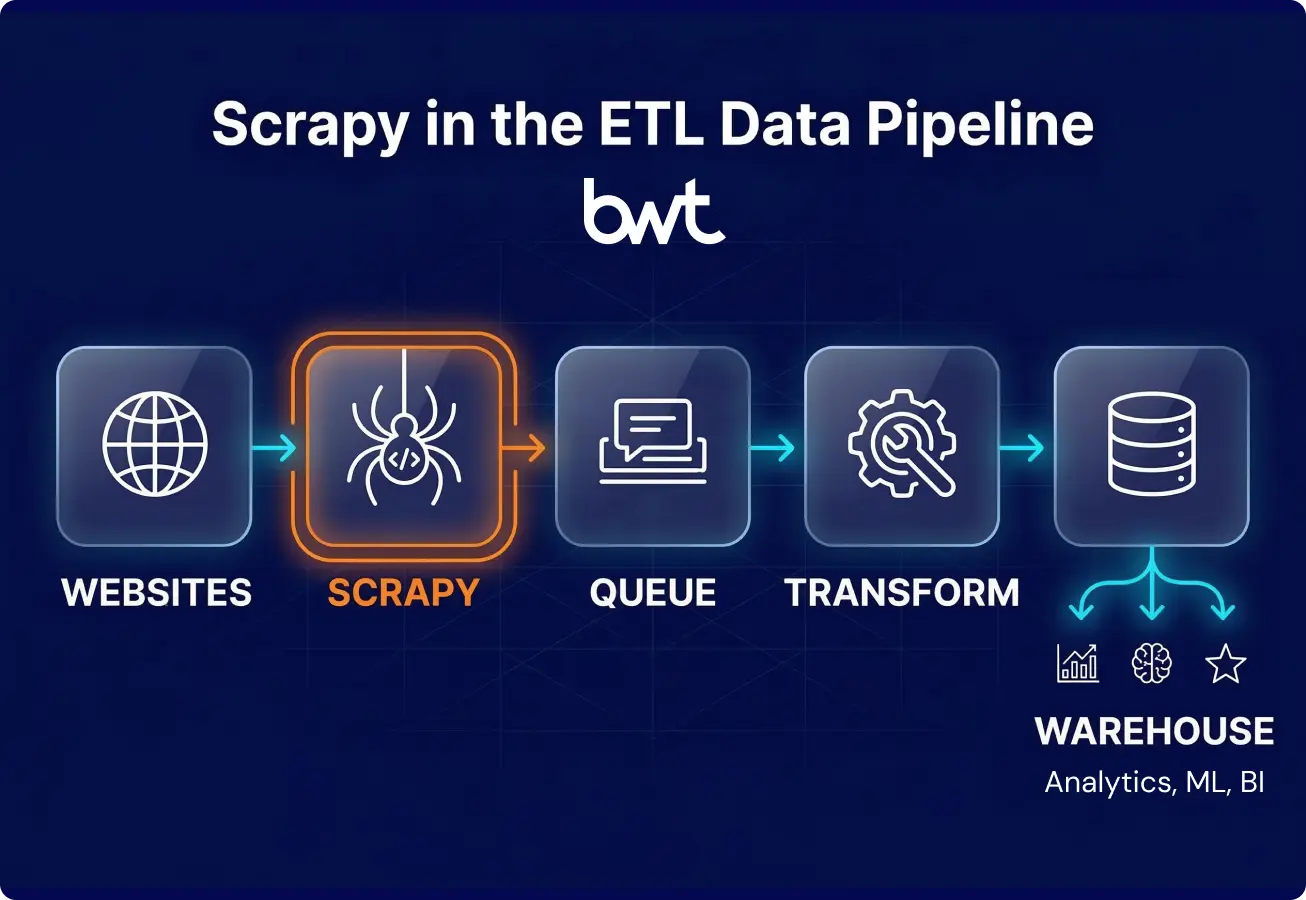
Scrapy does more than crawl and save. In modern architectures, it works as the ingestion layer of larger ETL workflows. A typical Scrapy ETL integration looks like this:
- Ingestion — Scrapy spiders collect raw HTML and extract structured data
- Transformation — tools like Airflow, dbt, or custom services pick up the raw output and normalize it
- Loading — cleaned datasets land in BigQuery, Snowflake, PostgreSQL, or wherever your warehouse lives
Your Scrapy data pipeline talks to these systems through custom pipeline classes, message queues, or straight API calls. That API-first approach is what lets Scrapy plug into real-time dashboards, recommendation engines, and ML training workflows without much ceremony. If you want context on how scraping fits into broader data work, our article on what is web scraping in data science covers the connection between extraction and analysis.
A real example: our GroupBWT team runs a competitive pricing pipeline for a European cosmetics brand, scraping 13+ retailers across 30+ regional locales. Scrapy spiders with TLS fingerprinting (via curl_cffi) extract product data, which flows through Azure Blob Storage into a PostgreSQL warehouse built for auditability and historical tracking. It runs on Kubernetes, processing 300,000+ records per session with 99% success rates against Akamai and Cloudflare protections — a working example of Scrapy ETL integration at enterprise scale. Adding new retailers or locales doesn’t mean rearchitecting anything.
One thing to note for 2026: AI training data collection is becoming a major use case. A January 2026 research paper by Bhardwaj, Diwan, and Wang benchmarked LLM-powered scraping agents across 35 websites with five security tiers. They found agents could complete extraction tasks with fewer than five prompt refinements. This points to a future of Scrapy where AI handles navigation while Scrapy manages request orchestration and the data pipeline — a partnership, not a replacement. Learn how AI driven web scraping reshaping the market.
“Companies build in-house scrapers and think the job is done. But then a website layout changes. The spider still runs, but it pulls the wrong prices. We call this a silent failure. Your team makes decisions on bad data, and you lose money. We saw an e-commerce client almost lose a lot of revenue because of this. You need strict QA on your pipelines. Every piece of data needs a check before it goes to your database. Data is only useful if you can trust it. If you have to guess if the numbers are right today, the system is broken.”
— Oleg Boyko, COO, GroupBWT
Legal Context for Data Pipelines
Building Scrapy web scraping pipelines without considering the legal angle? Bad idea. Two developments in particular deserve attention right now:
In Meta v. Bright Data (N.D. Cal., 2024), the court ruled that scraping publicly accessible data without a logged-in session doesn’t violate a platform’s terms of service. With the hiQ v. LinkedIn precedent, this gives public data scraping in the U.S. a solid legal basis.
Europe plays by different rules. Under GDPR, even public data needs a lawful basis (usually legitimate interest) and transparency about collection. The EU AI Act, with high-risk provisions effective August 2026, adds data governance requirements for training datasets — bias checks, quality assessments, and provenance documentation. As Taylor Wessing’s 2025 analysis on scraping and AI training data notes, Scrapy pipelines collecting AI training data should bake compliance into the pipeline itself — filtering personal data, generating audit logs, validating data quality — as pipeline stages, not afterthoughts. We wrote a practical guide on building GDPR web scraping personal data guidance that covers implementation details. For a broader look at where scraping sits legally, see the “Is web scraping legal” article.
Summary
After everything we’ve covered here, the takeaway is straightforward. Scrapy is one of the most mature and extensible Python crawling frameworks you’ll find. Its modular architecture, middleware ecosystem, and high-performance engine make it a strong default for teams building data extraction infrastructure.
When to use Scrapy: large-scale crawls across many domains, projects needing custom pipelines and data processing, Scrapy distributed crawling with shared queues, and any workflow where you want programmatic control over the full crawl lifecycle.
When to look elsewhere: purely interactive browser tasks (Selenium or standalone Playwright), quick one-off parsing (BeautifulSoup + httpx), or when the target has a proper API that makes scraping unnecessary. Any Scrapy tutorial worth reading should help engineers spot these boundaries early — knowing when not to use a tool matters as much as knowing how to use it.
The future of Scrapy comes down to two things: the completed migration to a high-performance non-blocking engine, and the regulatory push toward compliance-aware data collection. Engineers who understand both the architecture and the legal context will build the most solid scraping infrastructure.
Need Help Building a Scrapy Pipeline?
If you’re planning a large-scale scraping project — or struggling with one that’s already in production — we can help. GroupBWT builds and maintains Scrapy-based data pipelines for companies that need reliable, high-volume data extraction without the operational headache.
Talk to our engineering team about your project.
FAQ
-
Is Scrapy still relevant in 2026 with AI-powered scraping tools?
It is, and the reason is division of labor. Scrapy remains a dominant infrastructure layer for production Scrapy web scraping workflows — it’s the engine room, not the navigation deck. AI tools sit on top and handle the pattern-recognition stuff. LLM-powered agents are genuinely good at navigating unfamiliar site structures and spotting data patterns without much manual setup. But they still need something underneath for scheduling, rate limiting, proxy management, and data processing at scale. That’s Scrapy. A January 2026 benchmark across 35 websites showed AI agents handle exploration well, while frameworks like Scrapy handle execution. What we’re seeing in practice is teams pairing agent-based navigation with Scrapy’s pipeline and middleware stack — having an LLM generate CSS selectors dynamically while Scrapy keeps the crawl queue and retry logic running smoothly.
-
How does Scrapy handle JavaScript-rendered websites?
On its own? It doesn’t. Scrapy delegates JS rendering to headless browser tools through custom download handlers. The main approach is Scrapy + Playwright, which renders pages via Chromium, Firefox, or WebKit and returns fully rendered HTML to Scrapy for parsing. Setup means adding
scrapy-playwrightto your project, configuringDOWNLOAD_HANDLERSwithScrapyPlaywrightDownloadHandler, and passingmeta={"playwright": True}on requests that need rendering. The older Scrapy + Splash option uses a lighter rendering service but doesn’t match Playwright’s browser fidelity. Either way, Scrapy’s middleware and pipeline infrastructure stays intact — the crawl lifecycle stays unified instead of split across separate tools. -
What is the best way to scale Scrapy for millions of pages?
One machine first, then scale out. Tune Scrapy performance optimization settings before throwing hardware at the problem — raise
CONCURRENT_REQUESTS, turn onAUTOTHROTTLE, and enable HTTP caching. If one server can’t handle scraping millions of pages, set up a shared queue for Scrapy distributed crawling across multiple workers.scrapy-redisis the common choice — it stores requests and fingerprints in Redis for shared deduplication. Teams already running Kafka can usescrapy-kafka-exportto route items through Kafka topics. Deploy spider instances as stateless containers with centralized logging. Keep an eye on request rates and adjust Scrapy concurrency settings based on how target servers respond and what your own infrastructure can handle. -
Is web scraping legal?
It depends on the jurisdiction and what you’re scraping. In the United States, web scraping is generally legal for publicly accessible data. The Meta v. Bright Data (2024) and hiQ v. LinkedIn rulings established that scraping public data typically doesn’t violate terms of service or the Computer Fraud and Abuse Act. In the EU, GDPR applies even to public data — you need a lawful basis, opt-out mechanisms, and should respect robots.txt plus the emerging ai.txt convention some publishers use for AI crawling preferences. The EU AI Act adds more obligations for AI training data, effective August 2026. Talk to legal counsel for your specific case. Enforcement varies by jurisdiction and data category.
-
What changed in Scrapy during 2025–2026?
The headline change is Scrapy’s migration from Twisted to native asyncio — it took the whole 2.13–2.14 release cycle to land. Scrapy 2.13 (May 2025) flipped the asyncio reactor on by default, deprecated
start_requests()in favor ofasync def start(), and deprecated spider middlewares that lacked async support. Scrapy 2.14 (early 2026) broughtAsyncCrawlerProcessandAsyncCrawlerRunneras coroutine-based replacements for the old Twisted-era runners. The 2.13.3 cycle changed project template defaults toDOWNLOAD_DELAY = 1andCONCURRENT_REQUESTS_PER_DOMAIN = 1(previously 0 and 8) — conservative crawling as the starting point. On security, 2.13.4 patched a decompression bomb vulnerability (CVE-2025-6176) in the compression middleware. For migration: swapstart_requests()forasync def start()and convert Deferred-returning methods to coroutines. The framework handles backward compatibility during the transition, but deprecation warnings will show in logs. Any current Scrapy tutorial covering the 2.13+ cycle walks through the migration steps.